So as to experiment with some LLM tweakings on my personal computer, I decided to try my hand at a friendly competition using Gemma 2 with final layers prepared for classification tasks. The goal is to train the model on a LLM leaderboard dataset, LMSYS Arena, to predict which model is favored by public consensus on this arena. If interested, you can find all details of this competition on Kaggle, a hub of such training grounds for machine learning practitioners.
This was also interesting for me to learn how to play with the Kaggle API and synchronisation options. My workflow : adapt a well-known notebook for this competition to run locally a minimal working example of training a model suitable for the competition. Then write an inference notebook locally and push it to the website for running on their virtual machines. There was a myriad of small problems and hiccups to tackle, I will list a few of them for archiving and learning purposes.
TL;DR: QLoRA fine-tune of Gemma-2-9B on LMSYS Arena (3-class), on a subset of 2000 examples. Accuracy 0.475, macro-F1 0.468. Key tricks: Kaggle offline wheels, model hub instances, LoRA on Q/K/V.
Prerequisites if you want to try this out : HuggingFace/transformers basics, comfortable with working in a terminal.
Rapid overview of the problem and solution explored
Given a prompt (which can be a combination of different questions) and two model answers (A or B, the models are different for each row), the goal is to predict the user’s preference in answers (or if there is no preference, ie a tie). Here is one row of the training data, as an example :
 'model_a': 'claude-1'
 'model_b': 'gpt-3.5-turbo-1106'
 'prompt': ["What is the scientific probability of earth being the only habitable planet in the universe?","I don\'t think it really matters what some scientists \\"think\\" because it\'s very possible it  could all be a simulation. And there\'s actual evidence to back that up.","But what makes that a \\"radical\\" possibility, when it\'s the possibility with actual evidence?"]
 'response_a': ['["The scientific probability of Earth being the only habitable planet in the universe is very low, for several reasons: (...) The truth could be far weirder than we imagine!"]'],
 'response_b': ['["The scientific probability of Earth being the only habitable planet in the universe is currently unknown. (..) As scientific understanding continues to advance, it will be interesting to see how this concept evolves and whether new evidence emerges to support or refute the simulation hypothesis."]'],
 'winner_model_a': [0],
 'winner_model_b': [1],
 'winner_tie': [0],
 'labels': [1]}
The approach is to take a small LLM that fits in 16GB of VRAM (my computer’s GPU), here Gemma-2-9B, and fine-tune it with QLoRA on this three-class classification task, with all these infos concatenated as input (prompt, responses) in one big prompt.
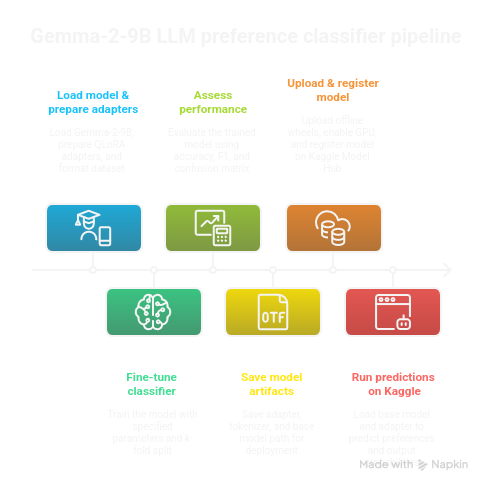
The Kaggle API
There are a lot of commands to handle Kaggle’s link with your computer in terminal - install them inside your preferred python env manager (I did uv pip install kaggle). First of all, create a kaggle token on the website. Then put kaggle.json (username <your-username>, key <list-of-numbers>) inside ~/.kaggle/kaggle.json.
One basic interaction is pushing and pulling code (your project scripts/notebooks are called kernels in the Kaggle ecosystem), here in the format of python notebooks, as you would do with a git client : kaggle kernels pull pottieral/training-gemma-2-9b-4-bit-qlora-fine-tuning -p ./kk_gemma2_qlora -m to pull notebook and metadata (the -p option receives the path where you wish to pull locally and the -m option receives a message when necessary). Kaggle calls the bunch of code plus artifacts and models linked to a specific project a “kernel”.
A key component in handling kaggle kernels is the file kernel-metadata.json at the root of your projects.
When all is in order in the metadata json, you only have to do kaggle kernels push to sync.
To list all available projects using your username :
kaggle kernels list -m <your-username>
Format to link a model to a kernel in the kernel-metadata.json "username/model-slug/framework/variation-slug/version-number", here is an example :
"model_sources": [
    "<your-username>/gemma2-adapter/Transformers/peft-lora-classifier/1",
    "<your-username>/gemma/Transformers/gemma2-9b-4bit-base/2"
  ]
The simplest way I found to link a model was to work from the kernel on the website and add it manually there, and then pull locally.
The dataset API is a bit simpler : kaggle datasets init -p gemma2-9b-4bit-base and go edit the json created in the specified path, and put what you need inside the path too. There is a more complete example below, when I explain how to use and install libraries from wheels when your notebook on the virtual machine does not have access to the internet; as in some competitions.
{
  "title": "dataset-name",
  "id": "<your-username>/dataset-name",
  "licenses": [{"name":"other"}],
  "isPrivate": true
}
⚠️ There are some errors if you supply a fancy title and then the id does not match, so for simplicity’s sake I would recommend to make the id and title match for all model, kernels and dataset jsons.
Here is a complete kernel-metadata.json as an example :
{
"id": "<your-username>/gemma2-message-classifier-inference",
"title": "gemma2-message-classifier-inference",
"code_file": "gemma-2-9b-4-bit-qlora-classif-inference.ipynb",
"language": "python",
"kernel_type": "notebook",
"is_private": true,
"enable_gpu": true,
"enable_tpu": false,
"enable_internet": false,
"keywords": [],
"dataset_sources": ["<your-username>/pip-wheels-bnb"],
"kernel_sources": [],
"competition_sources": [
"llm-classification-finetuning"
],
"model_sources": [
"<your-username>/gemma/Transformers/gemma2-9b-4bit-base/2",
"<your-username>/gemma2-adapter/Transformers/peft-lora-classifier/1"
]
}
⚠️ For "enable_internet": false see below to use wheels from a kaggle dataset.
Registering a model to the Kaggle model hub for use in your projects
First of all, I needed to fetch a pre-trained Gemma 2 model on huggingface. The python code to do that is : “
from huggingface_hub import snapshot_download
snapshot_download(
    repo_id="unsloth/gemma-2-9b-it-bnb-4bit",
    local_dir="gemma2-9b-4bit-base",
    local_dir_use_symlinks=False,
)
I needed to save locally my trained model (model.save_pretrained("out/adapter-fulltrain") and tokenizer.save_pretrained("out/adapter-fulltrain")).
Then I have to register both the base mode and my locally trained adapter, I’ll just have to load them both for inference. Kaggle allows to save several version (called instances) of the same model.
Inside the future model directory (create it before):
kaggle models init -p ./ : this creates the overarching model-metadata.json
then cd instance (create it before), and kaggle models instances init -p ./ : this creates model-instance-metadata.json for the current version of a model, linked to a framework.
kaggle models instances create -p ./ when the model files are ready to be pushed.
Add your models to the kernel metadata thus (latest number is the instance version, ⚠️ note the uppercase transformers framework) :
"model_sources": [
"pottieral/gemma/Transformers/gemma2-9b-4bit-base/2",
"pottieral/gemma2-adapter/Transformers/peft-lora-classifier/1"
]
You model folder should look like this :
![[Pasted image 20251015095225.png]]
Your model-metadata.json like this :
{
"ownerSlug": "<your-username>",
"title": "Gemma 2 classif LMSYS",
"slug": "gemma2-adapter",
"subtitle": "",
"isPrivate": true,
"description": "# Model Summary\n\n# Model Characteristics\n\n# Data Overview\n\n# Evaluation Results\n",
"publishTime": "",
"provenanceSources": ""
}
And your model instance like this :
{
"ownerSlug": "<your-username>",
"modelSlug": "gemma2-adapter",
"instanceSlug": "peft-lora-classifier",
"framework": "transformers",
"overview": "",
"usage": "# Model Format\n\n# Training Data\n\n# Model Inputs\n\n# Model Outputs\n\n# Model Usage\n\n# Fine-tuning\n\n# Changelog\n",
"licenseName": "other",
"fineTunable": false,
"trainingData": [],
"modelInstanceType": "Unspecified",
"baseModelInstanceId": 0,
"externalBaseModelUrl": ""
}
When updating a model, to push it to the kaggle repo,
kaggle models instances versions create "<your-username>/gemma2-adapter/Transformers/peft-lora-classifier" -p . --version-notes "Dummy new adapter version test"The long string is the model_instance: Model Instance URL suffix in format <owner>/<model-name>/<framework>/<instance-slug>. At each step, do not hesitate to use kaggle models instances versions create --help for the CLI manual. And here you are :
![[Pasted image 20251015104853.png]]
Installing new libraries without internet (and learn to use kaggle datasets!)
As far as I have gathered, competitions require that you run in an internet-less sandbox environment. Here is how I used python wheels and kaggle datasets to install required packages not pre-installed in the kaggle env.
mkdir -p wheels
pip download bitsandbytes==0.44.1 -d ./wheels
This could be sufficient, but as I encountered a “no space left on device” problem on my home, I complexified the command a bit, but the principle is the same. Using a temporary folder on a bigger SSD as env and install :
python3.11 -m venv /tmp/t311
source /tmp/t311/bin/activate
pip install -U pip
pip download triton==2.1.0 -d ./wheels
Create the related Kaggle dataset with :
kaggle datasets init -p .
kaggle datasets create -p wheels -r tar
If you need to update the dataset because you made changes to the wheels: kaggle datasets version -p ./wheels/ -m "add triton cp311"
Each such push is reflected on the website, at the address https://www.kaggle.com/datasets/<id>:
![[Pasted image 20251015180828.png]]
Here is, as an example, what the dataset-metadata.jsonlooks like for my wheels dataset :
{
"title": "pip-wheels-bnb",
"id": "<your-username>/pip-wheels-bnb",
"licenses": [
{
"name": "CC0-1.0"
}
],
"isPrivate": true
}
Then, here is an example of helper function to install one of those wheels to your sandboxed kaggle environment.
	def pip_local(*pkgs):
		cmd = [sys.executable, "-m", "pip", "install", "--no-index", f"--find-links={WHEELS}", "--no-deps", *pkgs]
		print(">>>", " ".join(cmd)); subprocess.check_call(cmd)

	pip_local("triton==2.1.0")
Key commands from the training code
Most of the imports are made from the transformers or peft packages.
@dataclass
class Config:
	output_dir: str = "output"
	checkpoint: str = "unsloth/gemma-2-9b-it-bnb-4bit"
	max_length: int = 1024
	n_splits: int = 5
	fold_idx: int = 0
	optim_type: str = "adamw_8bit"
	per_device_train_batch_size: int = 3
	gradient_accumulation_steps: int = 2
	per_device_eval_batch_size: int = 8
	n_epochs: int = 1
	freeze_layers: int = 16
	lr: float = 2e-4
	warmup_steps: int = 20
	lora_r: int = 16
	lora_alpha: float = lora_r * 2
	lora_dropout: float = 0.05
	lora_bias: str = "none"

config = Config()
Bnb-4bit makes use of NF4 quantization (NormalFloat-4) introduced with QLoRA, it approximates a normal distribution for better accuracy with a 4-bit budget. Global batch size per device is here 3*2.
training_args = TrainingArguments(
	output_dir="output",
	overwrite_output_dir=True,
	report_to="none",
	num_train_epochs=config.n_epochs,
	per_device_train_batch_size=config.per_device_train_batch_size,
	gradient_accumulation_steps=config.gradient_accumulation_steps,
	per_device_eval_batch_size=config.per_device_eval_batch_size,
	dataloader_num_workers=4,
	group_by_length=True,
	logging_steps=10,
	eval_strategy="epoch",
	save_strategy="steps",
	save_steps=200,
	optim=config.optim_type,
	fp16=False,
	bf16=True,
	learning_rate=config.lr,
	warmup_steps=config.warmup_steps,
)
Report_to none disables integration like WandB. Group by length handles sequences of similar length together to maximize GPU usage. The adapters are higher precision than the base model : FP16/BF16 (both same 16-bit floating point precision but BF16 has more bits for the exponent and FP16 for the mantissa). BF16 is the best default for training on modern GPUs : more range. AdamW 8-bit optimizer has a reduced memory footprint as compared to classic Adam/AdamW by encoding its two big tensors per parameter in 8-bit.
lora_config = LoraConfig(
	r=config.lora_r,
	lora_alpha=config.lora_alpha,
	target_modules=["q_proj", "k_proj", "v_proj"],
	layers_to_transform=[i for i in range(42) if i >= config.freeze_layers],
	lora_dropout=config.lora_dropout,
	bias=config.lora_bias,
	task_type=TaskType.SEQ_CLS,
)
LoRA learns two smaller matrices (rank r) for huge parameter saving, lora_alpha scales the update. Target_modules : here we apply the LoRA only to attention Q/K/V projections layers. TaskType.SEQ_CLS means sequence classification.
model = Gemma2ForSequenceClassification.from_pretrained(
config.checkpoint,
num_labels=3,
torch_dtype=torch.float16,
device_map="auto",
)
model.config.use_cache = False
model = prepare_model_for_kbit_training(model)
model = get_peft_model(model, lora_config)
Pay attention to the num_labels=3, this must match the labels in the training data. Initial weight dtype is torch.float16, and training precision will be bf16 as specified above - trainingArguments enables autocast during forward or backprop.
model.print_trainable_parameters()returns trainable params: 7,891,456 || all params: 9,249,608,192 || trainable%: 0.0853.
from transformers import set_seed; set_seed(42) is used to ensure reproducibility.
ds = Dataset.from_csv("./data/train.csv")
encode = CustomTokenizer(tokenizer, max_length=config.max_length)
ds = ds.map(encode, batched=True)
from sklearn.model_selection import StratifiedKFold
y = ds["labels"]
skf = StratifiedKFold(n_splits=config.n_splits, shuffle=True, random_state=42)
folds = [(train_idx.tolist(), val_idx.tolist()) for train_idx, val_idx in skf.split(np.zeros(len(y)), y)]This preserves the percentage of samples for each class for each divide of the training sample.
train_idx, eval_idx = folds[config.fold_idx]
trainer = Trainer(
	args=training_args,
	model=model,
	processing_class=tokenizer,
	train_dataset=ds.select(train_idx),
	eval_dataset=ds.select(eval_idx),
	compute_metrics=compute_metrics,
	data_collator=DataCollatorWithPadding(tokenizer=tokenizer),
	callbacks=[SpeedCallback(every=1)],
)

trainer.train()
We compute one one fold in that mve. CustomTokenizer is a simple preprocessing wrapper around the tokenizer, that’s why we pass the original tokenizer to the training function for saving and decoding for metrics. It parses/cleans columns (prompt, response_a, response_b), concatenates them into a single string per example, calls the real tokenizer with truncation to max_length, computes robust label integers (0/1/2), and returns a dict with input_ids, attention_mask, labels ready for the model. SpeedCallback is a simple callback to print for each steps some completion metrics over iterations.
Key commands from the inference code
from transformers import (
    GemmaTokenizerFast, Gemma2ForSequenceClassification, BitsAndBytesConfig
)
from peft import PeftModel
import torch, math

ADAPTER_DIR = "path/to/your/adapter"
BASE_DIR    = "path/to/base/model"

tok = GemmaTokenizerFast.from_pretrained(ADAPTER_DIR)

bnb = BitsAndBytesConfig(
	load_in_4bit=True,
	bnb_4bit_quant_type="nf4",
	bnb_4bit_compute_dtype=torch.bfloat16,
	bnb_4bit_use_double_quant=True,
)

id2label = {0: "A_wins", 1: "B_wins", 2: "tie"}
label2id = {v: k for k, v in id2label.items()}

base = Gemma2ForSequenceClassification.from_pretrained(
	BASE_DIR,
	num_labels=3,
	id2label=id2label,
	label2id=label2id,
	torch_dtype=torch.bfloat16,
	quantization_config=bnb,
	device_map="auto",
	low_cpu_mem_usage=True,
).eval()

model = PeftModel.from_pretrained(base, ADAPTER_DIR).eval()
The tokenizer is loaded from the adapter’s folder, so that potential added tokens are read in tokenizer_config.json or special_tokens_map.json. The bnb config shows QLoRA inference, with the big model compressed and the high-precision adapter. Mapping of labels explicitly is more robust and matches the preprocessing. Num_label must match the training number of labels. Now the model is the base model plus the adapters. ⚠️ Device map auto lets accelerate find space on GPU VRAM or CPU (if needed). The LoRA is then attached, for deployment we could instead merge_and_unload to fuse all, for simpler interfaces and slightly faster inference.
def _s(x):
	if x is None: return ""
	if isinstance(x, float):
		try: return "" if math.isnan(x) else str(x)
		except: return ""
	return str(x)

def make_text(p, ra, rb):
	return f"<prompt>: {p}\n\n<response_a>: {ra}\n\n<response_b>: {rb}"

@torch.inference_mode()
def predict_df(df, max_len=512, bs=8):
	A, B, T = [], [], []
	for i in range(0, len(df), bs):
		chunk = df.iloc[i:i+bs]
		texts = [make_text(_s(p), _s(a), _s(b))
			for p,a,b in zip(chunk["prompt"], chunk["response_a"], chunk["response_b"])]
		enc = tok(texts, truncation=True, max_length=max_len, padding=True, return_tensors="pt")
		enc = {k: v.to(model.device) for k,v in enc.items()}
		probs = model(**enc).logits.softmax(-1).cpu().tolist() # shape [N,3]
		for pa, pb, pt in probs:
			A.append(pa); B.append(pb); T.append(pt)
	return A, B, T

pa, pb, pt = predict_df(test, max_len=512, bs=8)
Inference_mode turns off some autograd related capabilities to make inference faster. We send the batches to the same device as the model, because if we do not do that tokenizers return CPU tensors by default. The probs line transforms model scores into interpretable per-class probabilities and moves it off GPU.
Conclusion
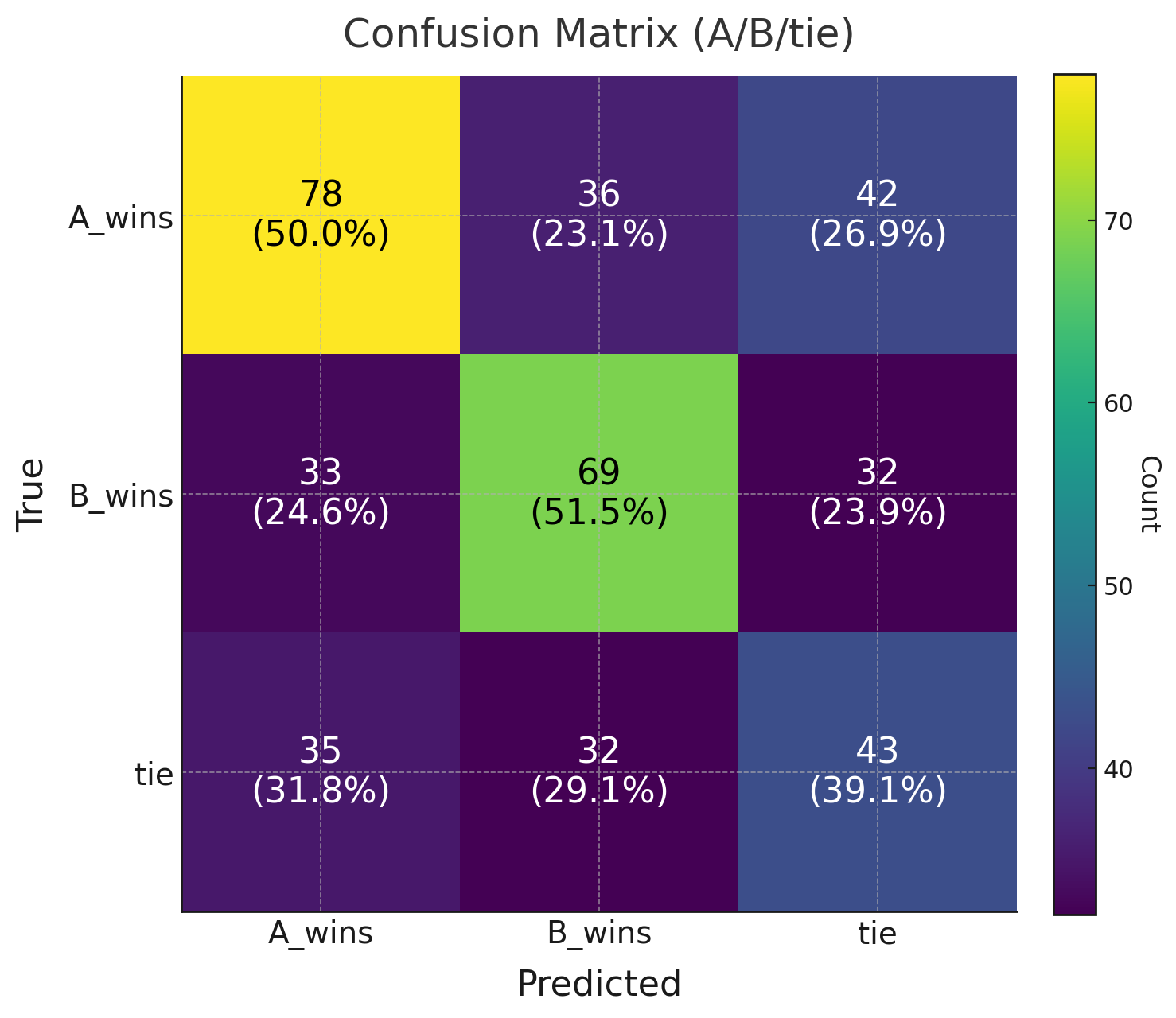
Training was so slow that I ran this only on a subset of the training data, as such results were not groundbreaking. After a few training runs and having gained 12 points compared to my very first run, I had an accuracy of 0.475, and a macro-F1 of 0.468. As a baseline, the majority accuracy is 37% and the random accuracy is 33%, so we are quite a bit above that. The confusion matrix shows there is still high noise in predictions, with A and B being swapped a lot of times, and ties underpredicted.
If I spend a bit more time on this problem, I would try adding more trainable parameters (like o_proj) to the LoRA, adding more of the training data and running more exploratory data analysis to check bias in the data and choose my training examples better. Trying out other models like Gemma3-9B, that would be the most straightforward. Maybe a custom metric with class weight for account for class imbalance.
This was a really interesting usecase to remove some rust and have more extensive experience with LoRA, as well as trying out the kaggle cli. Rather than coding, pushing and forget, the process of putting my notes and thoughts in order for this blog was also quite exhilarating. Thanks for reading, cheers if you made it to the end and read it all !
Useful links
- Training Gemma-2-9B 4-bit QLoRA (Kaggle)
- Kaggle API : Kernel metadata
- Python
dataclassesdecorator - Transformers :
Trainerargs - PEFT / LoRA docs
- PEFT model config tutorial
- LoRA paper · QLoRA paper
- Accelerate big-model guide
- PEFT target modules discussion
- PyTorch
inference_mode - Perf checklist
- LearnPyTorch workflow